> ## Documentation Index
> Fetch the complete documentation index at: https://docs.rendless.com/llms.txt
> Use this file to discover all available pages before exploring further.
# PHP Integration
> Render dynamic og images in PHP
This guide will walk you through the process of integrating Rendless with a PHP-based application. It's a straightforward process that requires some lines of code.
You will learn how to generate dynamic og images in PHP using Rendless.
# Step 1: Create a template and prepare it
First, create a template on the Rendless dashboard. You can create a template by clicking on the "Create template" button on the [Templates page](https://rendless.com/templates).
Design your template with the desired elements and add dynamic variables using the `{{variable}}` syntax to enable them to be replaced with custom data.
For more information, visit our guide on [dynamic images with variables](/essentials/variables).
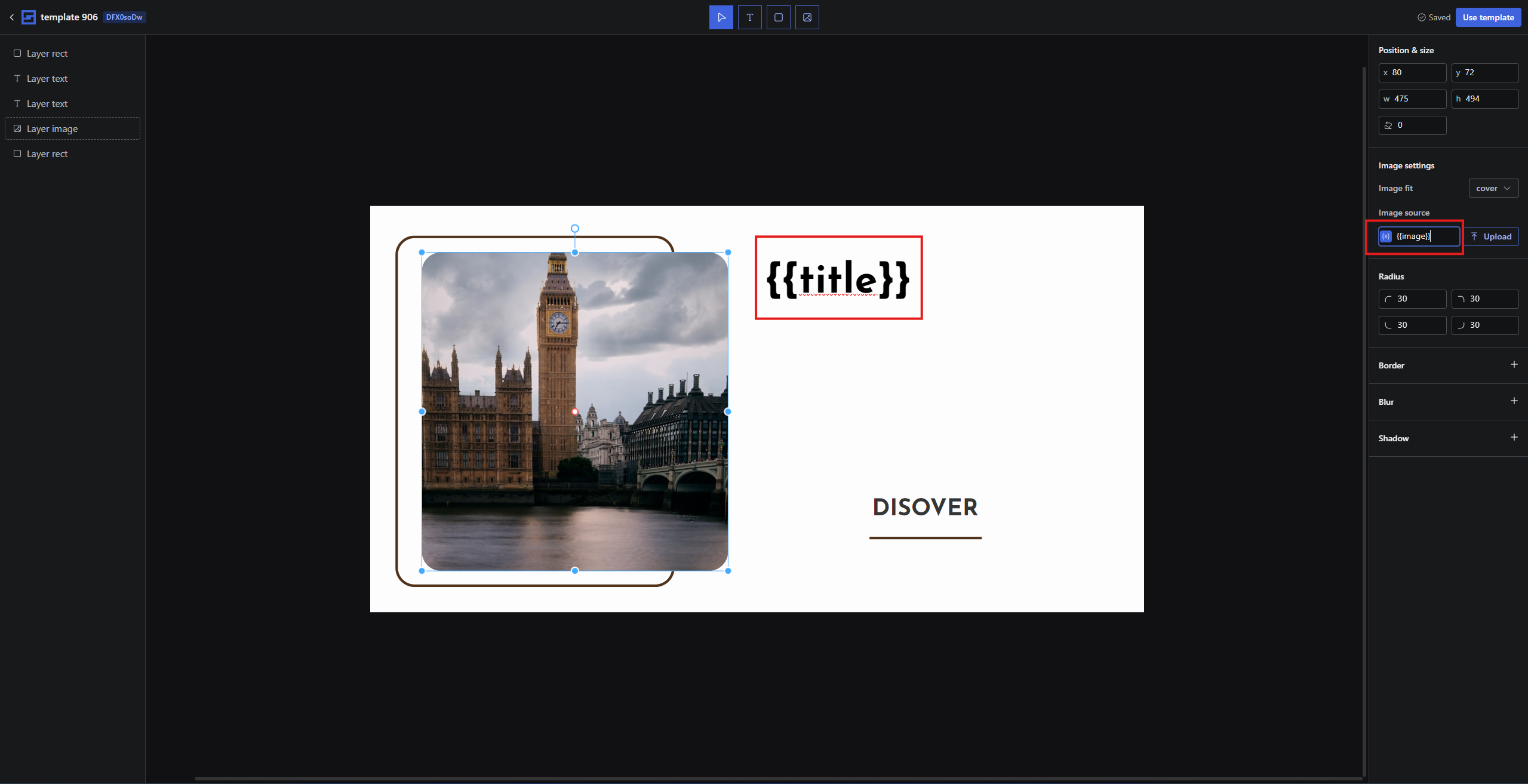 In the example above, the template has a title and an image. The title is denoted by `{{title}}`, and the image URL is represented by `{{image}}`. By default, the template will render with the static data unless you specify the dynamic values.
# Step 2: Get the image generation URL
Once your template is ready, generate the image generation URL by clicking on the "Use Template" button, either from the template editor page or the template list page.
In the example above, the template has a title and an image. The title is denoted by `{{title}}`, and the image URL is represented by `{{image}}`. By default, the template will render with the static data unless you specify the dynamic values.
# Step 2: Get the image generation URL
Once your template is ready, generate the image generation URL by clicking on the "Use Template" button, either from the template editor page or the template list page.
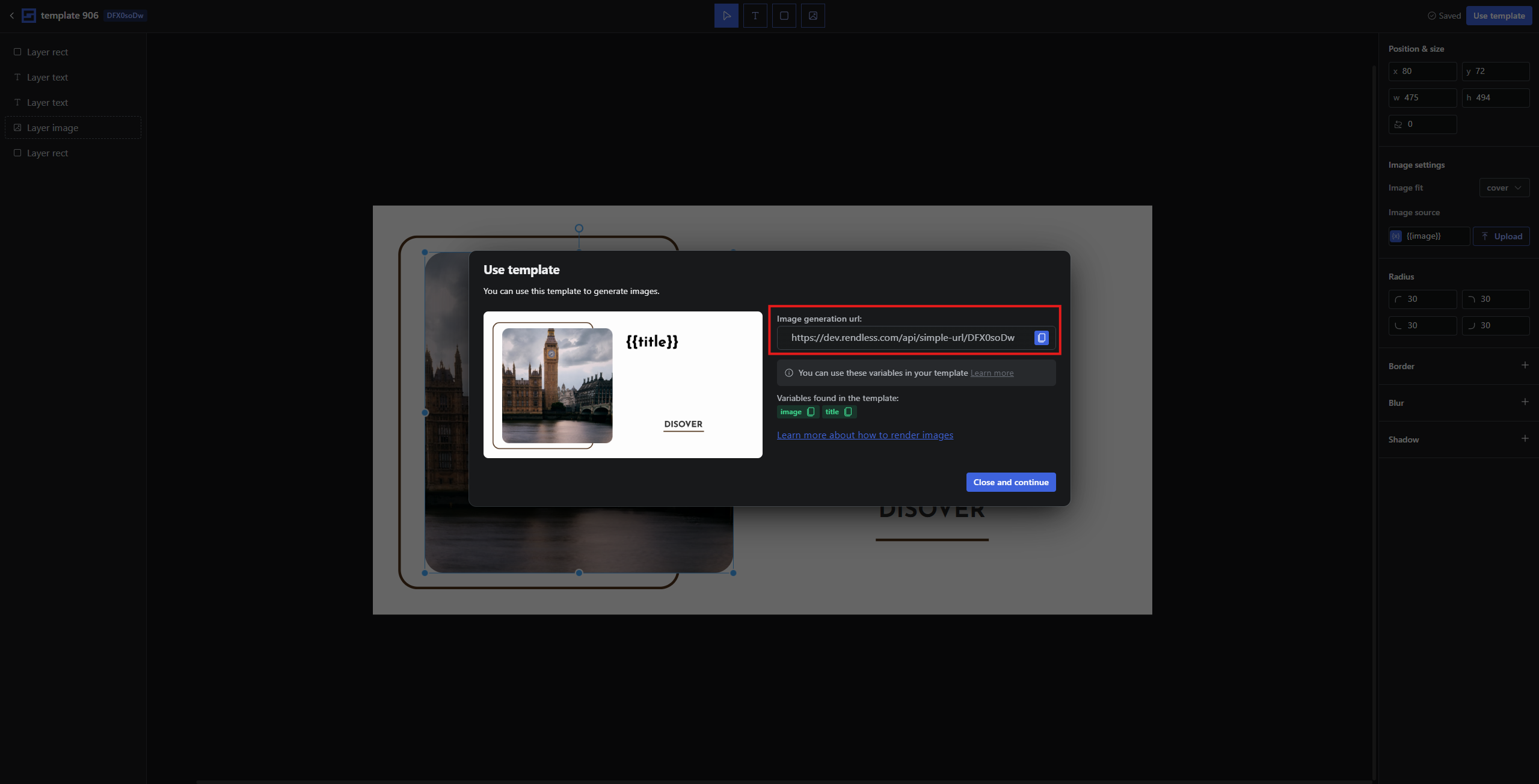 The image generation URL will be used in your PHP code to generate images dynamically with your data.
The URL looks something like this:
```
https://rendless.com/api/simple-url/TEMPLATE_ID
```
Replace `TEMPLATE_ID` with the actual ID of your template, and provide values for the variables via query parameters.
For example:
```
https://rendless.com/api/simple-url/TEMPLATE_ID?title=Hello&image=https://example.com/image.jpg
```
# Step 3: Integrate the image generation URL in your PHP application
Now, integrate the image generation URL into your PHP application. You can do this by including the URL within the `og:image` meta tag for Open Graph integration, which is commonly used in social media sharing.
For dynamic data, make use of PHP's `urlencode()` function to safely encode the values.
Here is an example of how you can add the dynamic og:image tag to your PHP application:
```php theme={null}
```
In the example above, `$pageTitle` and `$imageURL` are PHP variables that contain the title and image URL, respectively. You can place this code inside the head section of your HTML output, dynamically generating og tags for each page.
You can place this code inside the head section of your HTML output, dynamically generating og
tags for each page.
Now, when your page is shared on social media, the dynamically generated image will be displayed using the title and image URL provided in the PHP variables.
You can see the image generated dynamically:
The image generation URL will be used in your PHP code to generate images dynamically with your data.
The URL looks something like this:
```
https://rendless.com/api/simple-url/TEMPLATE_ID
```
Replace `TEMPLATE_ID` with the actual ID of your template, and provide values for the variables via query parameters.
For example:
```
https://rendless.com/api/simple-url/TEMPLATE_ID?title=Hello&image=https://example.com/image.jpg
```
# Step 3: Integrate the image generation URL in your PHP application
Now, integrate the image generation URL into your PHP application. You can do this by including the URL within the `og:image` meta tag for Open Graph integration, which is commonly used in social media sharing.
For dynamic data, make use of PHP's `urlencode()` function to safely encode the values.
Here is an example of how you can add the dynamic og:image tag to your PHP application:
```php theme={null}
```
In the example above, `$pageTitle` and `$imageURL` are PHP variables that contain the title and image URL, respectively. You can place this code inside the head section of your HTML output, dynamically generating og tags for each page.
You can place this code inside the head section of your HTML output, dynamically generating og
tags for each page.
Now, when your page is shared on social media, the dynamically generated image will be displayed using the title and image URL provided in the PHP variables.
You can see the image generated dynamically:
 # Conclusion
By following these steps, you can easily integrate Rendless dynamic image generation into your PHP application. Your dynamic og
tags will ensure that your shared content on social media looks engaging and personalized.
# Conclusion
By following these steps, you can easily integrate Rendless dynamic image generation into your PHP application. Your dynamic og
tags will ensure that your shared content on social media looks engaging and personalized.